
The Benazir Income Support Programme (BISP) is one of Pakistan’s largest social welfare initiatives, providing financial assistance to low-income families. Traditionally, payments were distributed through cash centers, retailers, and biometric verification systems to ensure transparency and reduce fraud.
With digital transformation in 2026, BISP is gradually shifting toward modern payment solutions such as bank accounts and digital wallets. This change aims to make payments safer, faster, and more convenient for beneficiaries who want better control over their funds.
Can You Transfer BISP Payment to a Bank Account?
Yes, BISP payments can now be transferred to a bank account, but this depends on whether you are enrolled in the updated digital payment system. Not all beneficiaries have direct bank transfer access yet, as the system is being rolled out in phases across Pakistan.
You can also read: 8171 Wazifa Check Online by CNIC
If you are eligible for digital payments, you can move your funds from your BISP wallet or withdrawal point into your personal bank account. This process improves financial security and reduces dependency on agents or cash centers.
Methods to Transfer BISP Payment to Bank Account
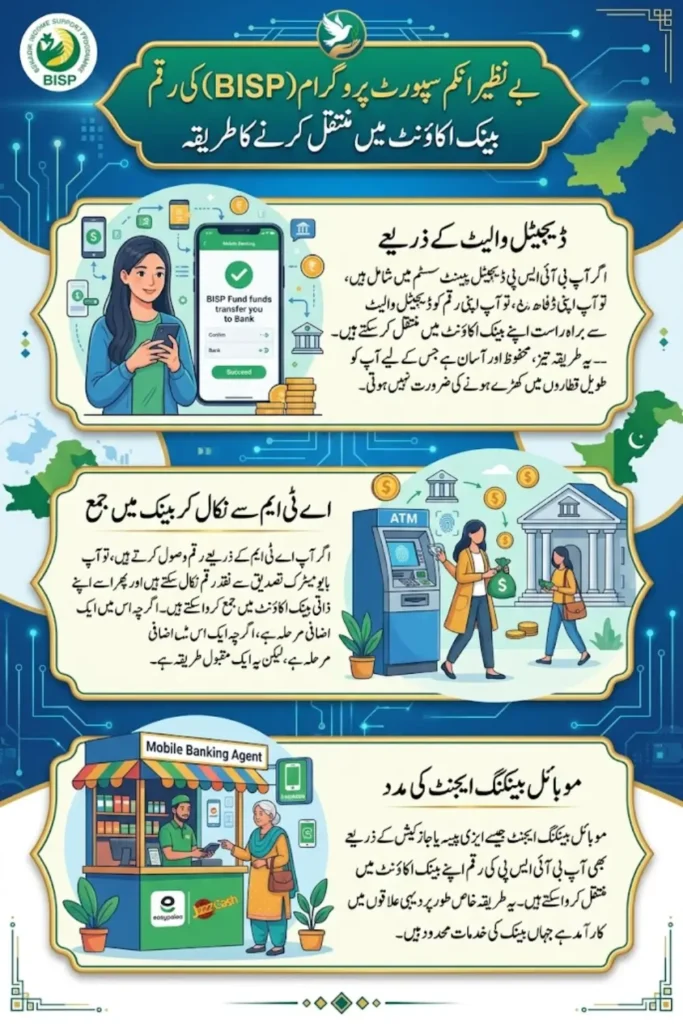
The easiest way to transfer your BISP payment is through a digital wallet linked to your CNIC. Once your payment is credited, you can transfer funds directly to your bank account using mobile apps or partner services.
This method is fast, secure, and eliminates the need to stand in long queues. It also allows you to keep a digital record of your transactions.
Using ATM Withdrawal and Bank Deposit
If you receive your payment through an ATM, you can withdraw cash using biometric verification and then deposit the amount into your bank account.
Although this method involves an extra step, it is still widely used in areas where digital wallets are not fully available.
Via Mobile Banking Agents
Mobile banking agents such as Easypaisa or JazzCash retailers can help transfer your funds to a bank account. After receiving your BISP payment, you can visit an authorized agent to send money digitally.
This option is helpful for people living in rural areas where banking services are limited but mobile agents are easily accessible.
Step-by-Step Process to Transfer BISP Payment
Follow these simple steps to transfer your BISP payment safely:
- Check your payment status via 8171 portal or SMS
- Receive payment in your wallet or withdraw from ATM
- Open your mobile wallet or banking app
- Select “Transfer Money” or “Send to Bank” option
- Enter your bank account details correctly
- Confirm the transaction using PIN or biometric verification
Always double-check your account number before confirming the transfer to avoid errors.
Required Documents and Information
Before transferring your BISP payment, make sure you have the necessary details ready. This helps avoid delays and ensures smooth transactions.
- Original CNIC
- Registered mobile number
- Active mobile wallet (if applicable)
- Bank account number (IBAN preferred)
- BISP payment confirmation SMS
Keeping these details updated is essential for successful transfers.
Comparison of Transfer Methods
| Method | Speed | Convenience | Availability | Fees (if any) |
|---|---|---|---|---|
| Digital Wallet Transfer | Fast | High | Expanding | Low/Free |
| ATM Withdrawal + Deposit | Medium | Moderate | Nationwide | Bank charges |
| Mobile Banking Agent | Medium | High | Widely Available | Small fee |
Choose the method that best suits your location and access to financial services.
Common Issues and Solutions
Some users may face difficulties while transferring their BISP payments. Most issues are related to verification or incorrect information.
- Biometric verification failure → Visit NADRA or BISP office
- Incorrect bank details → Re-enter correct information
- Payment not received → Check status via 8171
- Mobile number not registered → Update in BISP records
If problems continue, contact your nearest BISP Tehsil Office for assistance.
You can also read: BISP Digital Wallet System Activated
Safety Tips and Best Practices
Handling financial transactions requires caution, especially when dealing with government payments.
- Never share your CNIC or PIN with anyone
- Avoid unauthorized agents or middlemen
- Use only official apps and services
- Confirm SMS alerts before taking action
- Keep your mobile number active and secure
Following these tips helps protect your money from fraud and misuse.
Latest Updates on BISP Digital Payments 2026
In 2026, BISP introduced major improvements in its payment system, including digital wallets, bank integrations, and better verification processes. These updates aim to reduce fraud, improve transparency, and provide faster access to funds.
The government is also working with banks and fintech companies to expand direct bank transfers nationwide. In the near future, most beneficiaries will receive payments directly into their bank accounts without needing intermediaries.
Conclusion
Transferring your BISP payment to a bank account is becoming easier with new digital systems introduced in 2026. Whether you use a digital wallet, ATM withdrawal, or mobile agent, the process is simple if you follow the correct steps and keep your information updated.
Always rely on official BISP channels, verify your details carefully, and avoid unauthorized agents. With proper awareness and safe practices, you can manage your financial assistance more efficiently and securely.
You can also read: Apna Ghar Mehfooz Ghar Online Apply
FAQs
1. Can all BISP beneficiaries transfer payments to bank accounts?
No, this feature is currently available only for selected beneficiaries under the digital payment system rollout.
2. Is there any fee for transferring BISP payments?
Some methods like mobile agents or bank deposits may charge small fees, but digital transfers are often free or low-cost.
3. What is the safest method to transfer BISP payments?
Digital wallets linked with official services are considered the safest and most convenient option.
4. What should I do if my transfer fails?
Check your details and try again. If the issue continues, contact your nearest BISP office.


5. Can I use any bank account for receiving funds?
Yes, as long as the account is active and the details are entered correctly during the transfer process.